-
![]()
Joey Albert
Joey has been involved with tech ever since she joined the EaseUS editor team in March 2011 and now she is a senior website editor. She is good at solving various issues, such as video downloading and recording.…Read full bio -
Jean has been working as a professional website editor for quite a long time. Her articles focus on topics of computer backup, data security tips, data recovery, and disk partitioning. Also, she writes many guides and tutorials on PC hardware & software troubleshooting. She keeps two lovely parrots and likes making vlogs of pets. With experience in video recording and video editing, she starts writing blogs on multimedia topics now.…Read full bio
-
![]()
Gorilla
Gorilla joined EaseUS in 2022. As a smartphone lover, she stays on top of Android unlocking skills and iOS troubleshooting tips. In addition, she also devotes herself to data recovery and transfer issues.…Read full bio -
![]()
Rel
Rel has always maintained a strong curiosity about the computer field and is committed to the research of the most efficient and practical computer problem solutions.…Read full bio -
![]()
Dawn Tang
Dawn Tang is a seasoned professional with a year-long record of crafting informative Backup & Recovery articles. Currently, she's channeling her expertise into the world of video editing software, embodying adaptability and a passion for mastering new digital domains.…Read full bio -
![]()
Sasha
Sasha is a girl who enjoys researching various electronic products and is dedicated to helping readers solve a wide range of technology-related issues. On EaseUS, she excels at providing readers with concise solutions in audio and video editing.…Read full bio
Content

Jane Zhou
Updated On 06/18/2026
0 Views |
0 min read
Removing lead vocals from songs is no longer a complex studio task. With modern AI technology, you can easily separate the main singing voice from a song to create karaoke tracks, instrumentals, or remixes for videos and content creation. Unlike traditional vocal removal methods, which often degrade audio quality or remove all vocals, AI-powered lead vocal separation focuses on isolating lead vocals while preserving background vocals and instruments. This makes it ideal for songs with layered harmonies or detailed arrangements.
In this guide, you'll learn what lead vocals are, why removing them is useful, and how to remove lead vocals from songs online using an AI-based lead and backing vocal splitter quickly, accurately, and without installing any software.
Why Remove Lead Vocals from Songs?
Lead vocals are the main singing voice in a song; the part that carries the melody and lyrics. In many cases, users don't want to remove all vocals, but only the lead vocals, while keeping background or harmony vocals intact. This is especially important for modern songs with layered vocal arrangements. For this reason, many users specifically search for ways to remove lead vocals from songs rather than removing all vocals entirely.
Common reasons include:
- Remove lead vocals while keeping the music full and natural for karaoke or practice.
- Separate the main vocal to remix or reinterpret songs without affecting backing vocals.
- Hear the music clearly to improve pitch, timing, and vocal control.
- Keep songs as background music without overpowering narration or dialogue.
Share this post now if you find it helpful!

Best Way to Remove Lead Vocals from Songs Online
1. EaseUS Lead & Backing Vocal Splitter
EaseUS Lead & Backing Vocal Splitter is a powerful online tool that makes removing lead vocals from songs fast, easy, and accurate. Powered by AI, it can separate the main singing voice from backing vocals and instrumentals, delivering clean, professional-quality results without complex studio techniques or software installation.
This tool is perfect for singers, musicians, and content creators who want to create karaoke tracks, make covers or remixes, practice singing, or use songs in videos without overpowering narration. By isolating only the lead vocals, it preserves the background harmonies and instruments, keeping the music full and natural. It also supports multiple audio formats, ensuring flexibility for different projects.
 EaseUS Lead & Back Vocal SplitterLead or backing vocals, split with ease
Powered by Advanced AI
Key Features:
- Supports lead and backing vocal separatio: Remove the main vocal while keeping background vocals intact
- Online use, no installation required: Works directly in your browser on any device
- High audio quality retention: Maintain the original instrumental and backing vocals
- Supports multiple audio formats: MP3, WAV, FLAC, and more for flexible use
Steps to isolate lead vocals from music:
Step 1. Click Choose File to select the track you want to process in your browser, or you can directly paste a link.
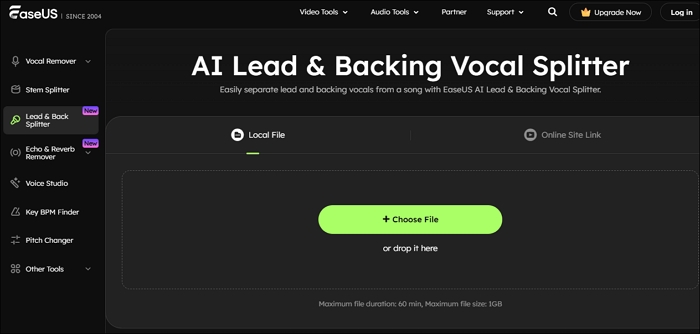
Step 2. Select the Start Separation button, then wait for it to process. Mute the back vocals, preview the result, and if you are not satisfied, try the enhanced processing.
Step 3. Once done, click Export and download the backing track.
2. LALAL.AI
Another option for separating vocals is LALAL.AI Lead & Back Vocal Splitter, an AI-powered online tool that can isolate lead vocals and backing tracks from songs. It works directly in your browser—upload a song, let the AI process it, and download the separated stems. LALAL.AI is ideal for creating karaoke tracks, remixes, or practicing vocals, offering high-quality results with minimal effort.
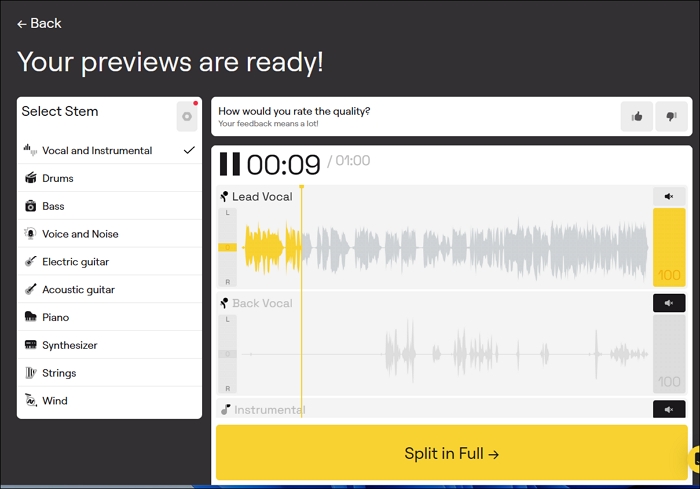
Step 1. Go to the official website and open its Lead & Backing Vocal Splitter from the Products menu.
Step 2. Select the track from your computer or device.
Step 3. Listen to the lead vocal separation and download the full stem if you're satisfied with the result.
3. AudioCleaner AI
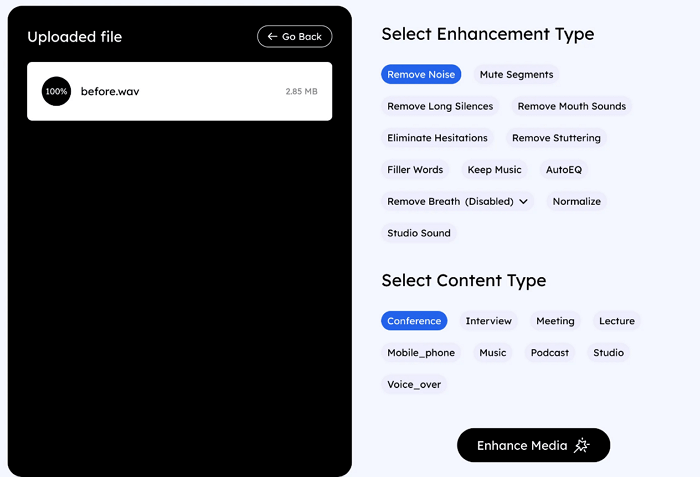
AudioCleaner AI Lead Vocal Remover is a lightweight online tool that focuses on fast processing and clean vocal separation. Unlike some general-purpose vocal splitters, it automatically optimizes tracks for clear karaoke and practice use, minimizing artifacts in the instrumental. Its simplicity makes it ideal for quick edits, covers, or video projects without any installation.
Tips & Best Practices for Lead Vocal Separation
To get the best results when separating lead vocals from a song, keep these points in mind:
1. Check your audio format
Most tools work best with widely used formats like MP3, WAV, or FLAC. Using an unsupported or compressed format can reduce separation accuracy and audio quality.
2. Use high-quality original tracks
Songs with higher bitrate or lossless audio produce cleaner vocal isolation. Low-quality or heavily compressed files may result in artifacts or incomplete separation.
3. Consider song complexity
Tracks with multiple layers, dense mixing, or heavy effects can be harder to process perfectly. Older recordings or songs with overlapping vocals may leave traces of the lead vocals even after processing.
4. Be aware of tool limitations
Different tools have varying processing speeds, file size limits, and format support. Large audio files may take longer to process, and some free versions may restrict downloads or advanced features.
Following these tips can help you achieve professional-sounding karaoke tracks, remixes, or practice versions with minimal artifacts.
Final Words
Removing lead vocals from songs has never been easier thanks to modern AI-powered tools. Tools like EaseUS Vocal Splitter, LALAL.AI, and AudioCleaner make it simple to isolate lead vocals while preserving background harmonies and instrumentals, keeping your tracks full and natural. By following best practices, using high-quality audio, considering song complexity, and checking tool limitations—you can ensure professional results every time.
Ready to create your own karaoke tracks or remix a favorite song? Try EaseUS Lead & Backing Vocal Splitter today and separate lead vocals in minutes with just a few clicks.
EaseUS Lead & Back Vocal SplitterLead or backing vocals, split with ease
Powered by Advanced AI
FAQs
1. Can I remove only the lead vocals without affecting backing vocals?
Yes. Tools like EaseUS Lead & Backing Vocal Splitter allow you to isolate the main singing voice while keeping background harmonies and instrumentals intact. This ensures karaoke tracks, covers, and remixes sound natural.
2. Will removing lead vocals affect the audio quality?
If you use high-quality tracks and AI-powered tools, the audio quality remains largely intact. Using low-bitrate or heavily compressed files may result in minor artifacts, so it's recommended to start with original or lossless recordings for the best results.
3. Are these vocal separation tools free to use?
Most AI vocal separation tools offer free trials or limited-use versions. EaseUS Lead & Backing Vocal Splitter provides easy online access without installation, while platforms like LALAL.AI and AudioCleaner AI may have free and paid options depending on file length and processing features.
4. Which songs are harder to separate vocals from?
Songs with dense mixing, layered vocals, or heavy effects can be more challenging. Older tracks or complex arrangements might leave traces of the lead vocals even after separation, so adjusting settings or using enhanced processing may help.
5. Can I use the isolated tracks for commercial purposes?
It depends on the copyright of the original song. AI vocal separation tools allow you to create karaoke, covers, or personal practice tracks, but commercial use may require proper licensing from the copyright owner. Always check copyright restrictions before distributing or monetizing the separated audio.