-
![]()
Joey Albert
Joey has been involved with tech ever since she joined the EaseUS editor team in March 2011 and now she is a senior website editor. She is good at solving various issues, such as video downloading and recording.…Read full bio -
Jean has been working as a professional website editor for quite a long time. Her articles focus on topics of computer backup, data security tips, data recovery, and disk partitioning. Also, she writes many guides and tutorials on PC hardware & software troubleshooting. She keeps two lovely parrots and likes making vlogs of pets. With experience in video recording and video editing, she starts writing blogs on multimedia topics now.…Read full bio
-
![]()
Gorilla
Gorilla joined EaseUS in 2022. As a smartphone lover, she stays on top of Android unlocking skills and iOS troubleshooting tips. In addition, she also devotes herself to data recovery and transfer issues.…Read full bio -
![]()
Rel
Rel has always maintained a strong curiosity about the computer field and is committed to the research of the most efficient and practical computer problem solutions.…Read full bio -
![]()
Dawn Tang
Dawn Tang is a seasoned professional with a year-long record of crafting informative Backup & Recovery articles. Currently, she's channeling her expertise into the world of video editing software, embodying adaptability and a passion for mastering new digital domains.…Read full bio -
![]()
Sasha
Sasha is a girl who enjoys researching various electronic products and is dedicated to helping readers solve a wide range of technology-related issues. On EaseUS, she excels at providing readers with concise solutions in audio and video editing.…Read full bio
Content

Myra
Updated On 06/18/2026
0 Views |
0 min read
Dune 3 is known for its huge, spacious sounds, but those lush reverbs can easily wash out a mix if you leave them unchecked. This guide shows how to remove reverb in Dune 3 so you can keep your synth patches clean, controlled, and ready for professional mixing.
Overview About Dune 3
Dune 3 is a flagship virtual synthesizer by Synapse Audio, available as a plugin for major DAWs on Windows and macOS. It combines virtual analog, wavetable, and FM synthesis with a powerful modulation system and a large factory library aimed at modern electronic, cinematic, and pop production.
One of Dune 3's standout features is its flexible effects section, which includes two master FX busses that can host reverb, delay, chorus, phaser, distortion, EQ, and more. Many of the factory presets are designed to sound impressive in isolation, so they ship with generous reverb and delay that create a huge, atmospheric character right out of the box.
What Causes Reverb in Dune 3
Dune 3 offers several reverb algorithms aimed at creating wide, cinematic spaces, including room and hall‑style reverbs as well as more expansive modes suited to pads and ambient textures. Factory presets often push parameters like decay time, size, and mix to create a "wow" factor when flipping through sounds on their own.
Pads, plucks, and leads frequently ship with long tails and high wet mixes, so they feel big and epic without any extra processing. When you drop those same patches into a busy arrangement, that built‑in space competes with your external reverbs and delays, which is why Dune 3 users often feel there is "too much reverb" on many presets.
5 Steps to Remove Reverb in Dune 3
Step 1. Load the preset you want to clean up and make sure Dune 3's interface is fully expanded so you can see the lower panels.
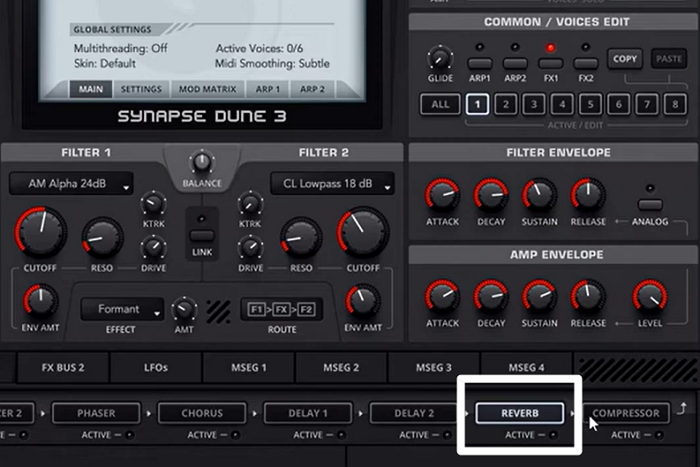
Step 2. Go to the FX page and locate FX1 and FX2, where the effects for the preset are hosted.
Step 3. Click the on/off or Active button to disable it and hear the dry sound.
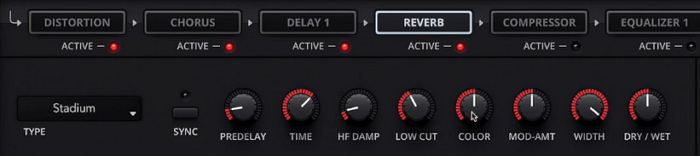
Step 4. If you still want some space, lower the Dry/Wet control and shorten the Time instead of turning it off completely.
- Lower the Dry/Wet control to 0: This tells DUNE 3 to play only the original, unprocessed (dry) signal, effectively eliminating the reverb sound from the output.
- Shorten the Time: This only changes how long the reverb tail lasts, making it a shorter burst of sound. It does not remove the effect itself.
Step 5. Save it as a new patch, so you can reuse it without repeating these edits.
Here is a video guide for Dune 3 sound design, and it introduces how to adjust reverb settings.
Tips for Cleaner Dune 3 Sounds
Dune 3 excels at lush, spacious patches, but cleaner sounds shine better in mixes by focusing on dry signals and precise tweaks.
- Start with minimal FX: This is crucial for sound design. You want to sculpt the core sound in isolation before adding space, allowing the dry signal to have maximum impact.
- Layer smartly: Use 1-2 oscillators per layer (e.g., saw + sub), detune subtly (5-10 cents), and cut low-end with filter HPF to avoid mud.
- A/B test often: Toggling effects on and off is the best way to objectively judge if an effect is enhancing the sound or masking its core character.
- EQ inside synth: Basic subtractive EQ within the synth prevents problematic frequencies from even reaching subsequent effects or the main mix channel.
- Modulate lightly: Overly aggressive modulation can make sounds sound unstable or messy. Subtle modulation adds character and life without sacrificing clarity.
- Save "mix-ready" banks: Tag presets "Clean/NoVerb" for quick recall in dense tracks. Workflow optimization is key. Having clean starting points saves significant time during production.
Easy Way to Remove Reverb from Audio Online
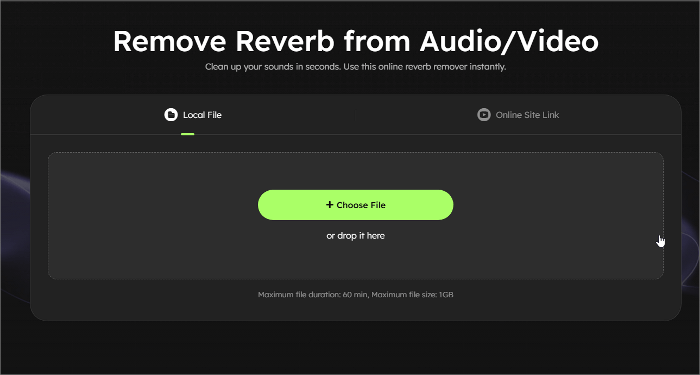
For users seeking a reverb remover for recorded audio files, online tools offer a fast fix. EaseUS Online Reverb Remover stands out for instant reverb cleanup on audio/video files, no downloads or plugins needed.
Key Features:
- Automatically detects and strips reverb tails while preserving vocal/synth clarity, turning roomy recordings into studio-dry audio.
- Drag-drop files up to 1GB/60min or paste YouTube links, and AI processors will deliver clean MP3 downloads ready for mixing.
- Suitable for musicians, content creators, music lovers, and educators seeking greater vocal clarity.
 EaseUS Reverb RemoverClear reverb, crisp sound—try now!
Powered by Advanced AI
Conclusion
Mastering how to remove reverb in Dune 3 unlocks professional, mix-ready synth sounds that cut through any track. From simple FX bypass toggles to an AI-powered online reverb remover with EaseUS, these steps ensure dry, punchy patches every time.

How to Remove Reverb in Dune 3 FAQs
Why does Dune 3 have so much reverb on presets?
Factory presets in Dune 3 use reverb on FX1 and FX2 busses to create impressive solo sounds. However, this lush reverb often muddies full mixes, so bypassing it gives you full control over the dry signal.
Does shortening the reverb time fully remove it?
Shortening the reverb Time or Mix parameters does not fully remove it. These adjustments only tame the tails while keeping some wet signal, so complete removal requires bypassing the effect or using external cleanup tools.
How do I save a dry Dune 3 preset?
To save a dry Dune 3 preset, make your FX edits first, then use "Save As" and include "NoVerb" or "Dry" in the name. Organize these into custom banks for faster workflow across projects.