-
![]()
Joey Albert
Joey has been involved with tech ever since she joined the EaseUS editor team in March 2011 and now she is a senior website editor. She is good at solving various issues, such as video downloading and recording.…Read full bio -
Jean has been working as a professional website editor for quite a long time. Her articles focus on topics of computer backup, data security tips, data recovery, and disk partitioning. Also, she writes many guides and tutorials on PC hardware & software troubleshooting. She keeps two lovely parrots and likes making vlogs of pets. With experience in video recording and video editing, she starts writing blogs on multimedia topics now.…Read full bio
-
![]()
Gorilla
Gorilla joined EaseUS in 2022. As a smartphone lover, she stays on top of Android unlocking skills and iOS troubleshooting tips. In addition, she also devotes herself to data recovery and transfer issues.…Read full bio -
![]()
Rel
Rel has always maintained a strong curiosity about the computer field and is committed to the research of the most efficient and practical computer problem solutions.…Read full bio -
![]()
Dawn Tang
Dawn Tang is a seasoned professional with a year-long record of crafting informative Backup & Recovery articles. Currently, she's channeling her expertise into the world of video editing software, embodying adaptability and a passion for mastering new digital domains.…Read full bio -
![]()
Sasha
Sasha is a girl who enjoys researching various electronic products and is dedicated to helping readers solve a wide range of technology-related issues. On EaseUS, she excels at providing readers with concise solutions in audio and video editing.…Read full bio
Content

Jane Zhou
Updated On 06/18/2026
0 Views |
0 min read
Can Audacity Find BPM Automatically?
Audacity now includes automatic tempo-detection features starting with version 3.5, which can detect the tempo of loops and help align audio clips to the same BPM.
However, this feature is not the same as a dedicated one-click BPM detector found in specialized tempo analysis tools. Audacity's built-in tempo detection is designed to help align loops and estimate BPM, but may not provide the most accurate or reliable results for entire tracks, complex rhythms, or bulk scanning. In older versions of Audacity, there isn't an official automatic BPM detection feature, and users often resort to manual calculations or third-party plugins.
As a result, many users still look for professional BPM Finder tools that can automatically and accurately detect BPM across full tracks with a single click, especially when working with full song files rather than short loops.
Step-by-Step Guide to Find BPM in Audacity
Although Audacity doesn't work like a dedicated BPM detection tool, there are two practical ways to find or estimate BPM, depending on the version you're using and your workflow.
#1. Use Audacity's Built-in Tempo Feature (Audacity 3.5+)
Starting with Audacity 3.5, the app added automatic tempo detection for loops and tempo-based editing features, which can help you estimate BPM during editing. This can be useful if you are preparing audio for alignment or creating rhythm grids.
Step 1. Open Audacity, click File > Import > Audio to import your target audio file and load it.
Step 2. Right-click the timeline to select the track, then select Analyze > Beat Finder, and adjust the Threshold Percentage as needed. After that, click Apply.
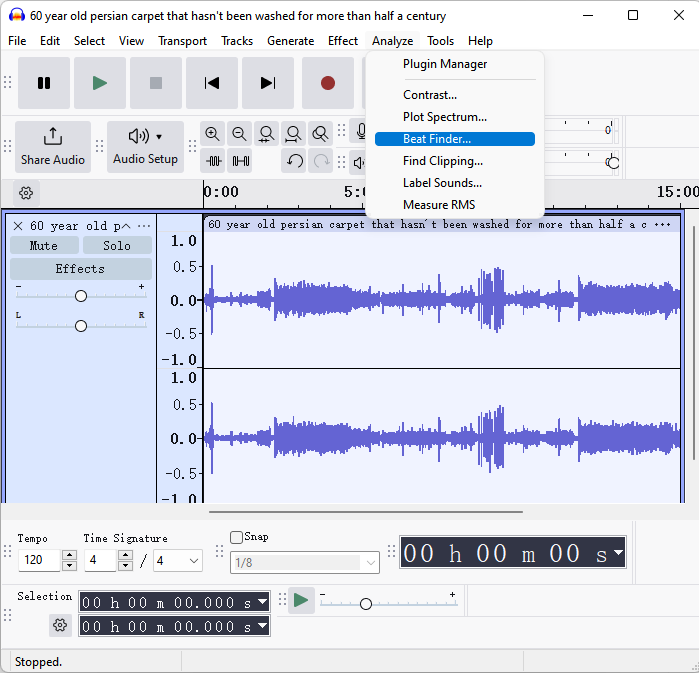
Step 3. Once done, you will see the BPM showing below the audio track.
#2. Manual Count or Plugins
If you're using older versions of Audacity or the built-in tempo estimate isn't giving you a clear number, you can still find BPM through manual counting or by using plugins.
Manual BPM Calculation
- Zoom in on a clear, steady beat segment of the track.
- Select a Time Range with Clear Beats.For example, select a 15-second stretch where the beat is obvious.
- Manually count how many beats occur within that 15 second window.
- Apply the BPM Formula: BPM = (Number of Beats × 60) ÷ duration in seconds
Use a Rhythm Plugin
Audacity has plugins (including Beat Finder in some tutorials) that mark approximate beat positions on your track:
- Go to Analyze > Beat Finder (if available) or import a third-party plugin like a Vamp tempo detector.
- Run the plugin to mark beat positions.
- Use the markers to visually estimate BPM based on spacing.
Share this post if you find it helpful!

An Easier Way to Find BPM Automatically
If you want a faster, more accurate, and hassle-free way to find BPM, EaseUS BPM Key Finder is the ideal solution. Unlike Audacity, which requires manual counting or plugin setup, this tool is designed specifically for detecting BPM and musical key instantly, making it perfect for DJs, remixers, and music producers.
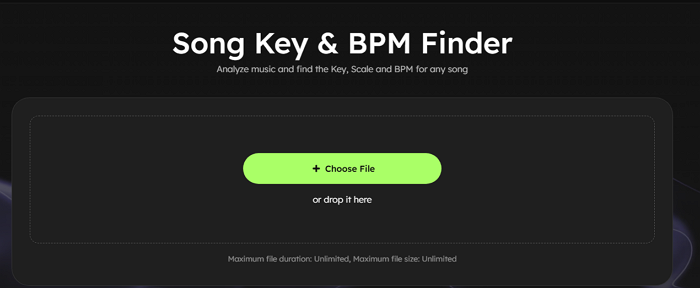
Why EaseUS BPM Key Finder stands out:
- Works independently with any audio file
- No plugins or installation, and ready to use in one step
- Instantly analyzes full tracks, loops, or complex rhythms
- Detects musical key simultaneously
- Intuitive interface, no prior audio editing experience required
 EaseUS Online Vocal Remover100% music and voice separation
Powered by Advanced AI
With these features, you can skip manual calculations, tedious grid alignment, and plugin installation, saving time and avoiding potential errors.
Here are the steps you can check:
Step 1. Click Choose File to upload your song file.
Step 2. Then, it will start working and show the result in seconds.
Conclusion
Finding BPM in Audacity is possible, especially for loops or short segments, but the process can be time-consuming and less accurate for full-length tracks or complex rhythms. Manual counting or plugins can help, but they also require extra steps and effort.
For those looking for a fast, reliable, and beginner-friendly solution, EaseUS BPM Key Finder provides automatic BPM detection along with musical key identification, making it the easiest way to get accurate results and save time.
FAQs
1. Can Audacity automatically detect BPM?
Audacity 3.5 and later includes tempo detection for loops and rhythm-based editing, but it does not provide a dedicated one-click BPM detector for full-length tracks. Manual calculation or plugins are often required for accurate results.
2. How do I find BPM manually in Audacity?
Zoom into a steady beat segment, count the number of beats in a known time range, and calculate BPM using the formula: BPM = (Number of Beats × 60) ÷ duration in seconds. Plugins like Beat Finder can also help mark beats visually.
3. Is there an easier way to detect BPM without Audacity?
Yes, tools like EaseUS BPM Key Finder automatically detect BPM and musical key instantly, without manual counting, plugins, or complex setup.
4. Can EaseUS BPM Key Finder detect BPM for full songs?
Yes, it works on full-length tracks, loops, and even complex-rhythm songs, providing fast, accurate results.